


by: SEO Strategist
Ashot Nanayan
Updated March 29, 2026
7 min. read

WhatsApp
 (+1) 818 355 1889
WhatsApp
(+1) 818 355 1889
WhatsApp
(+1) 818 355 1889
WhatsApp
(+1) 818 355 1889
WhatsApp
(+1) 818 355 1889
SEO is stressful. You can pour time, energy, and budget into your site for a year or more, then wake up to an Ahrefs or Google Analytics alert telling you your traffic has suddenly dropped. (In my second life, I’m definitely becoming a space veteran, lol.)
Over the years, a lot of “injured” websites with sudden traffic drops have landed in our hands. Many of them went home happy and grateful. Some didn’t. Sometimes, no matter how hard you work, you’re just not that lucky.
In this post, I want to talk about sudden drops in organic traffic, walk you through a few real cases we’ve handled, and share the most common reasons and solutions we keep seeing.
If you’re in a similar situation right now, I hope this helps you understand what might be going on, or you can simply reach out to our SEO agency, and we’ll investigate your case in detail.

In SEO, pretty much anything is possible. We’ve seen it all. Cases where a developer accidentally added a noindex tag to key templates. Sites that got affected the same week a new Google core update rolled out. Traffic drops caused by messy redirects after a redesign. Even servers randomly timed out so often that Google slowly dropped pages out of the index.
So before we start talking about all the “big” reasons and solutions, I want you to understand what kind of situation you’re actually in. Otherwise, you’ll waste hours looking for the wrong problem.
In this section, I’ll walk you through a quick 15-minute triage map: what to check first, and in what order.
In many cases, you’ll recognize your situation almost immediately. If you do, great: you’ll know where to focus next. If not, you can move on and dig deeper into the more complex reasons and solutions I’ll cover later in this case study.
One of the first things I like to rule out is a crawling or indexing issue. A sudden traffic drop can sometimes be as simple (and painful) as Google not being able to access or index your pages properly.
Even if your pages were indexed before, don’t assume they still are.
Open Google Search Console and check your coverage, impressions, and the indexing status of your key URLs.
Look at your “ Crawled – currently not indexed ” or “ Discovered – currently not indexed ” reports.
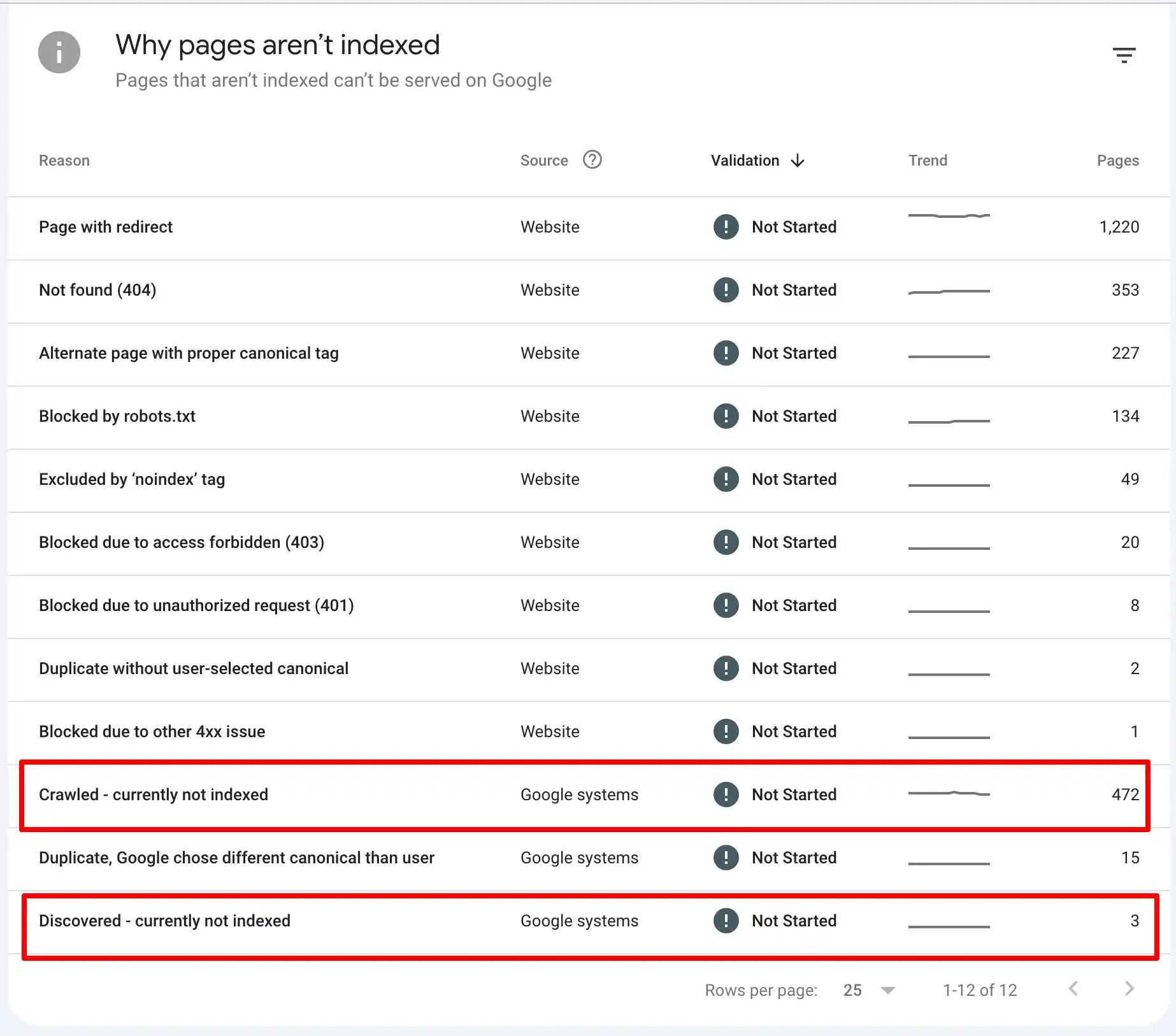
Make sure you don’t have any important pages that are out of the index.
Recently, I’ve seen Google quietly de-index parts of a site because of low-quality content, thin sections, or constant server uptime issues. So even if this feels like a “less common” reason, it’s worth checking early.
I’ve also seen cases where a developer “just” added a noindex tag to one layout, and it applied across an entire template.
Whole sections of the site disappeared from search overnight. This usually happens when developers don’t have much SEO context and make changes without thinking about crawlability or indexation.
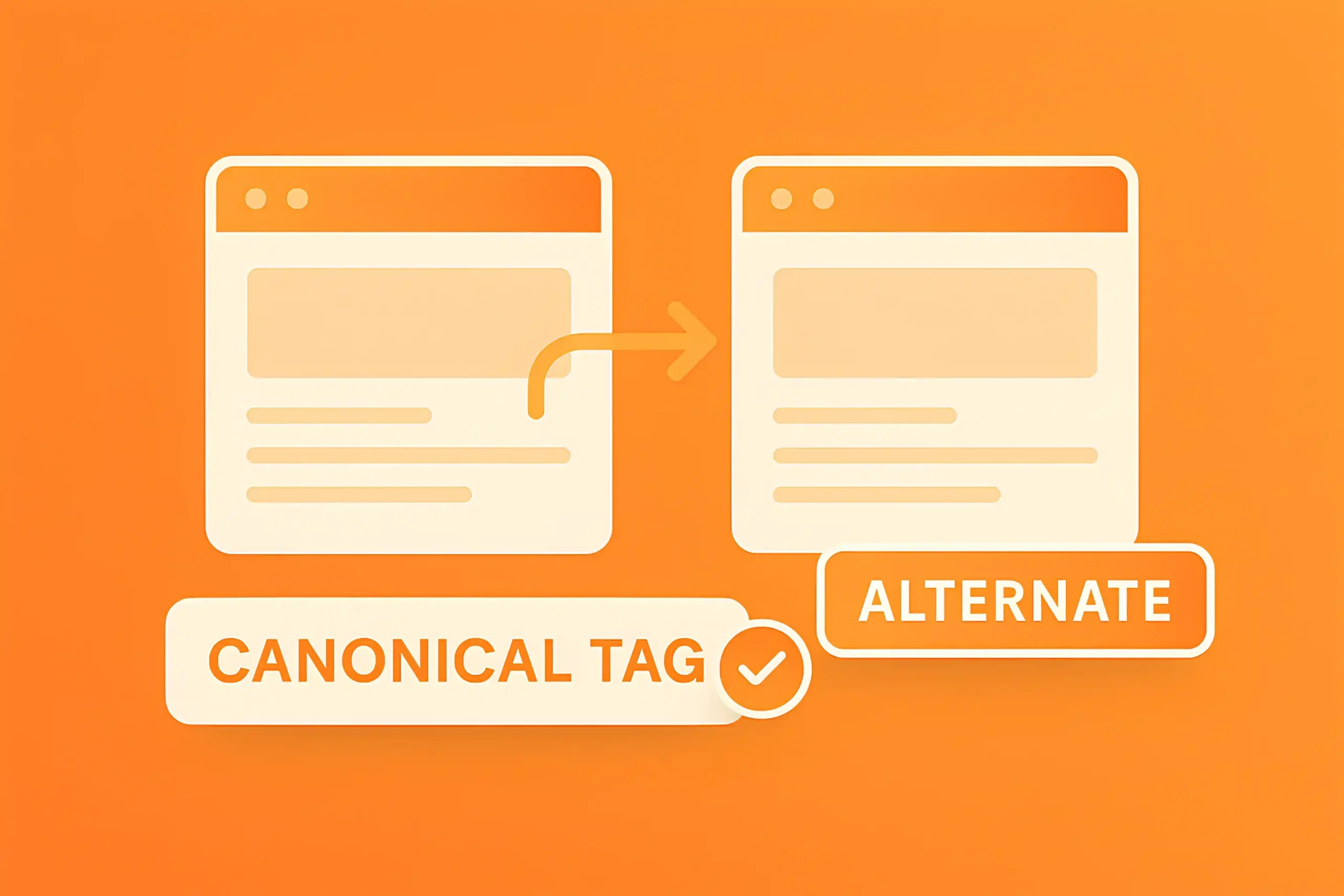
Also read: How to Fix ‘Alternate Page with Proper Canonical Tag
Another risk is robots.txt. If you (or your SEO consultant) recently updated robots.txt to “optimize crawl budget,” there’s a chance some important folders or templates were blocked by mistake.
A single disallow directive can quietly remove your core pages from Google’s radar.
If you’re working on a big site or doing enterprise SEO with hundreds or thousands of URLs, use Indexcheckr.com or run a fresh site audit in tools like Ahrefs or SEMrush to quickly see which important pages dropped out of the index.
Once you’re sure Google can crawl and index your key pages, you can move on to deeper causes with more confidence.
These are two completely different stories. If your rankings dropped from, say, top 3 to page 2, then yes, you’ll naturally lose traffic. That usually points to things like stronger competitors, a core update, or quality/relevance problems.
But there’s a weirder scenario I keep seeing lately: your main keywords are still in good positions, but impressions are down, and clicks are followed. On paper, your rankings look “fine,” but the traffic isn’t there anymore.
After AI Overviews rolled out, a lot of websites started experiencing this. Your result is technically still on page one, but it’s pushed further down by AI boxes, more ads, and extra SERP features.
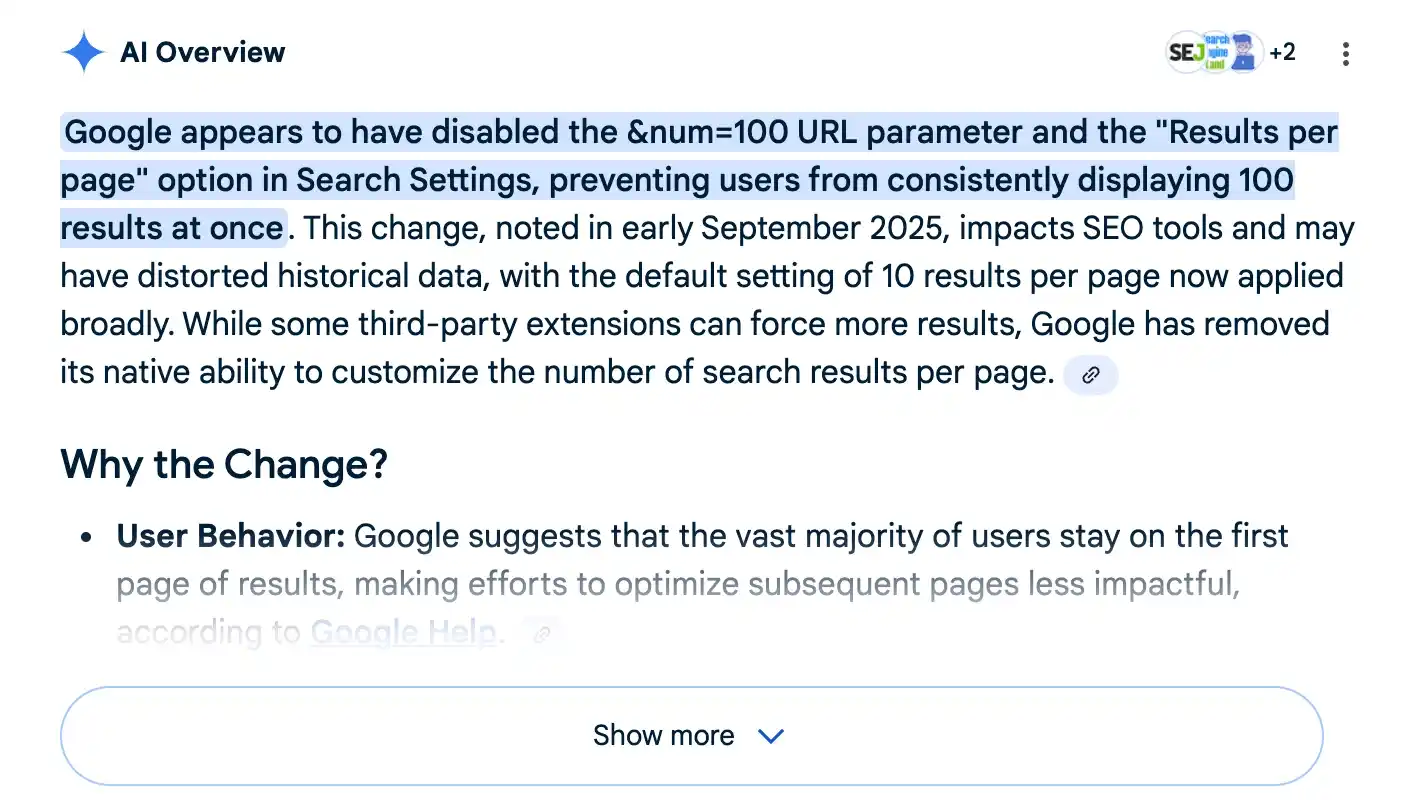
Users don’t scroll as much, and the total search demand that reaches your blue link.
There’s also a more “silent” reason: losing rich snippets.
If you had FAQ, review stars, or other enhanced snippets and Google removes them after a recrawl, you might not see a sharp crash, but you’ll notice a steady decline in traffic over the next few weeks.
You should also check where the drop is happening: is it site-wide, section-wide, or tied to specific page types?
This part is very important.
If the whole site is down, you might be dealing with a core update, technical issue, or something broad like server problems.
If only the blog got affected, but your product or service pages are stable, that’s a content/intent or update-related issue. If only one template type is affected (for example, category pages or location pages), then you’re probably looking at something specific to that layout, internal linking, or how that group matches new SERP expectations.
The best place to understand this is Google Search Console, not Ahrefs or Semrush. Third-party tools are great for trends, but they work with estimates.
In GSC, you can filter by URL folders, page groups, or specific sections and see exactly which parts of your site lost impressions and clicks. That’s how you avoid panicking over the entire domain when, in reality, only one section is in trouble.
Finally, redesign, CMS change, domain change, moving to a new server, cleaning up URLs, and changing structure; all of these can trigger sudden traffic drops.
Sometimes it’s temporary. You do a redesign, Google needs time to recrawl everything, understand the new structure, process redirects, and traffic slowly stabilizes again, even if you don’t touch anything.
But in other cases, especially after SEO migrations, you can be stuck for months if there are serious issues under the hood: broken redirects, missing pages, internal links pointing to 404s, URL changes that created cannibalization, or important pages quietly losing their authority.
So, if you’ve recently done a redesign, domain change, CMS migration, or major structural updates and then got hit with a sudden drop, I’d strongly recommend a professional SEO audit before you start looking around.
I’ve been doing SEO for more than seven years now. In that time, I’ve worked as a consultant, a fractional SEO lead, and through my agency, and we’ve seen pretty much every kind of traffic collapse you can imagine.
Clean cliffs overnight, slow downhill slides, weird “stairs” after each update… You name it.
In this part, I want to walk you through a few real cases with charts and screenshots. I’ll show you what the drop looked like, what we found when we dug into the data, the most likely reason behind each pattern, and how we approached fixing it (or at least stabilizing it).
When you compare these shapes to your own graph, there’s a good chance you’ll recognize one of them, and that alone can already narrow down what’s broken.
In this screenshot, you’re looking at a healthcare website that came to us after a brutal, sudden traffic drop. When we dug into Google Search Console and their backlink profile, we quickly saw the problem: they’d been hit with a manual penalty.
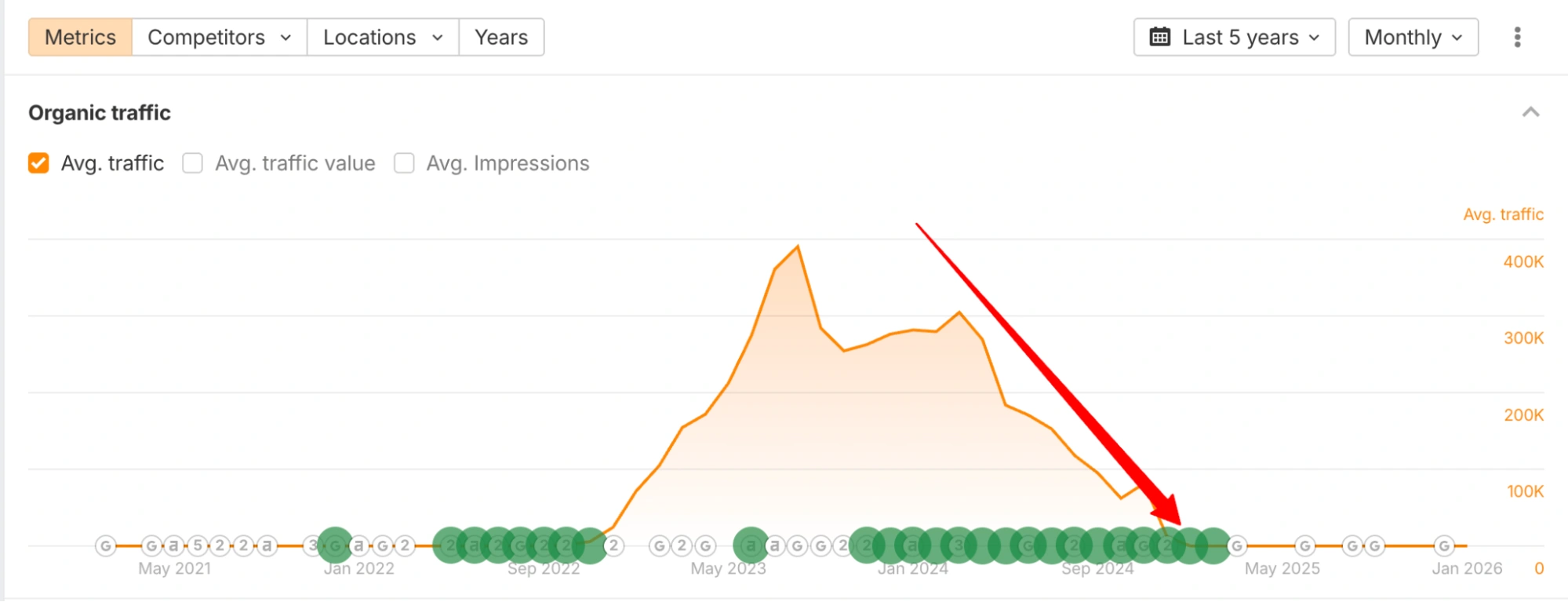
The reason is that they were selling hundreds of outbound links with exact-match or near-exact-match anchor text.
It wasn’t a PBN or a classic link farm built only for link-building. It started as a good healthcare blog that grew to 300,000+ organic visits per month. But once the traffic and authority kicked in, they began selling backlinks aggressively, and Google eventually responded.
By the time they approached us, the damage was already pretty serious.
We cleaned up as much as we could: removed/edited a lot of those obvious “sold” links, addressed the issues called out in the manual action, and worked on getting the penalty lifted.
In the end, the most realistic long-term solution was to migrate the site to a new domain and rebuild properly.
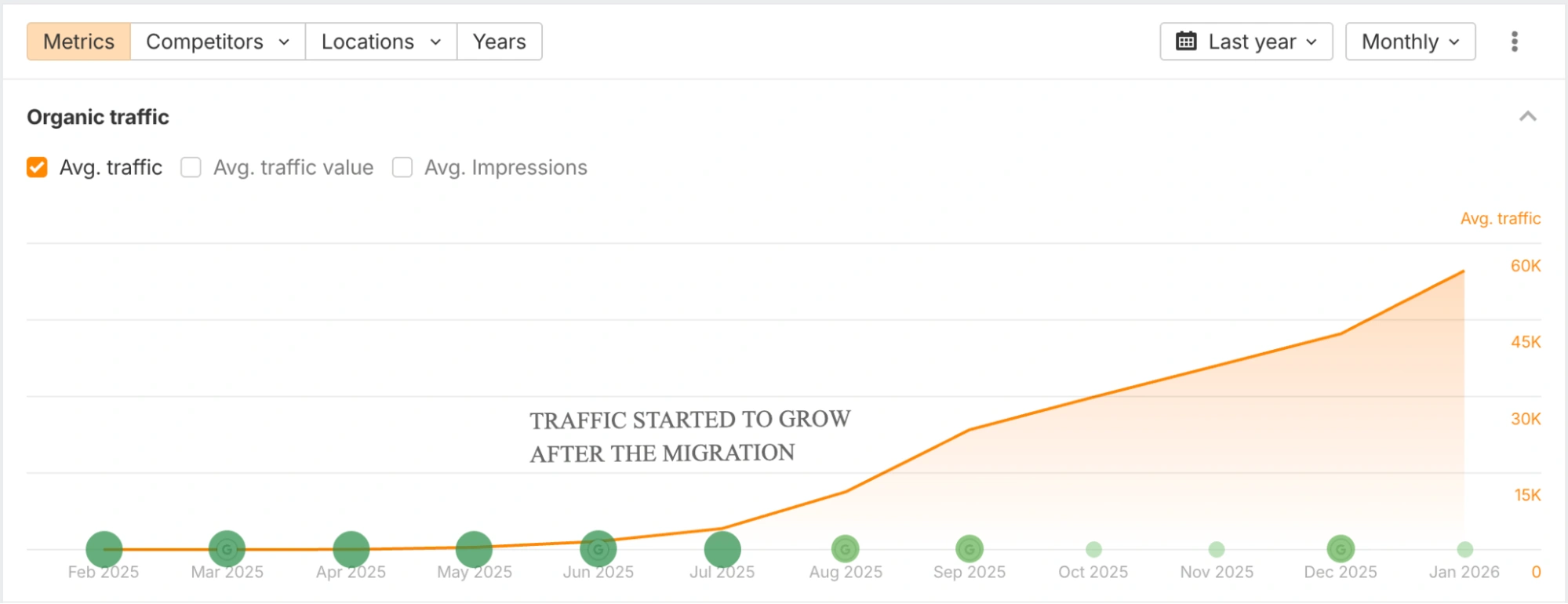
As you see in the screenshot, that worked, but it wasn’t a quick fix. Of course, we also focused on removing the penalty, not just running away from it. I’ll break down the full migration process and our approach in a separate eCommerce SEO migration case study.
In this screenshot, you’re looking at one of our eCommerce SEO projects. The client started working with us in March 2025. They didn’t come to us saying, “We’ve been hit, help.” They just wanted growth.
But when we opened their Search Console and analytics, we noticed a clear traffic decline across different pages. It wasn’t one section, it wasn’t one template, and nothing pointed to indexing issues, redirects gone wrong, or a manual penalty.
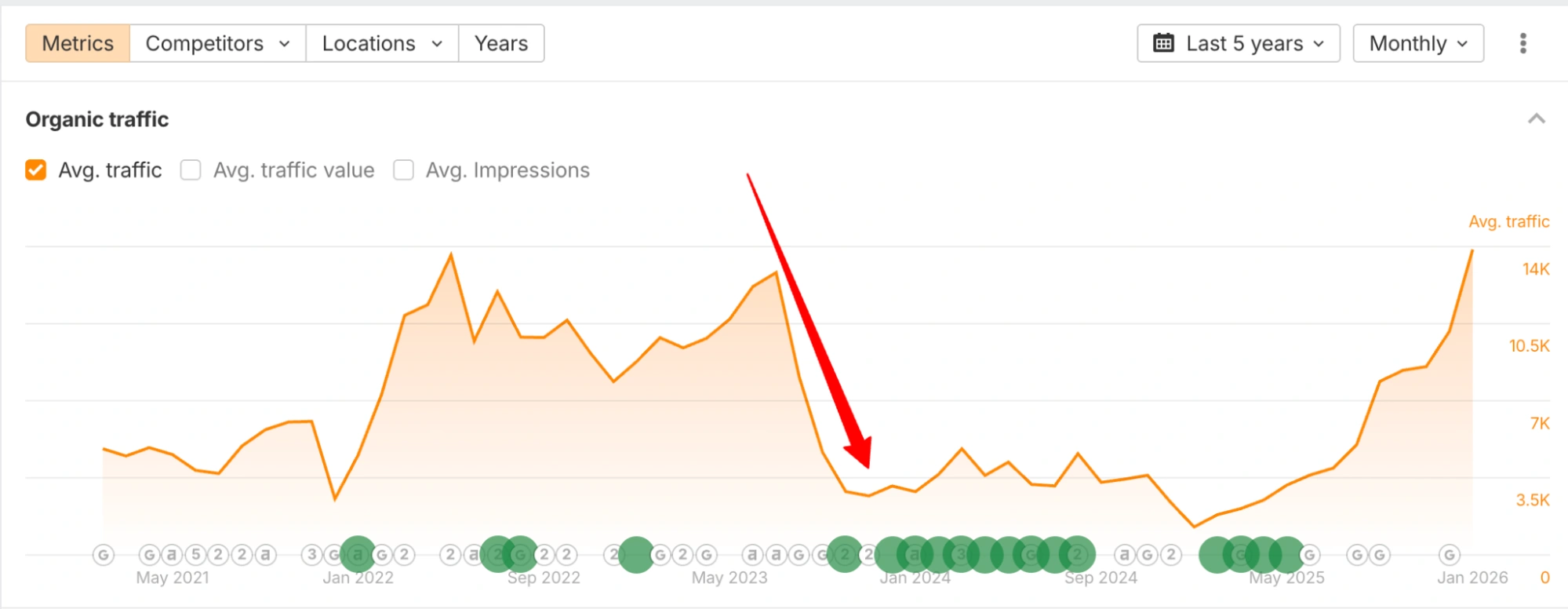
What we found was a lot more “boring,” but very common: pure competition. For years, they hadn’t really done any proper SEO. No killer content strategy, no link-building, no technical care.
It worked for a while because the niche wasn’t that competitive. But as Google started reevaluating players in the same space and competitors invested in SEO, they slowly took over the key positions.
The good news is that such a drop is fixable if you’re willing to do the work. As you can see from the chart, starting from around May 2025, we were able to recover and grow their traffic.
If you want to dive deeper, we’ve published 10 detailed eCommerce SEO case studies (including this one) where I break down the situation, what we found, and the exact steps we took to turn things around.
This kind of story has happened to us many times: a Google core update rolls out, and a few weeks later, a client appears with a graph that’s gently but consistently sliding down.
In this case, it was an automotive website. They noticed the traffic drop early and, instead of waiting until things were completely dead, they reached out to Digital World Institute to figure out what was going on.
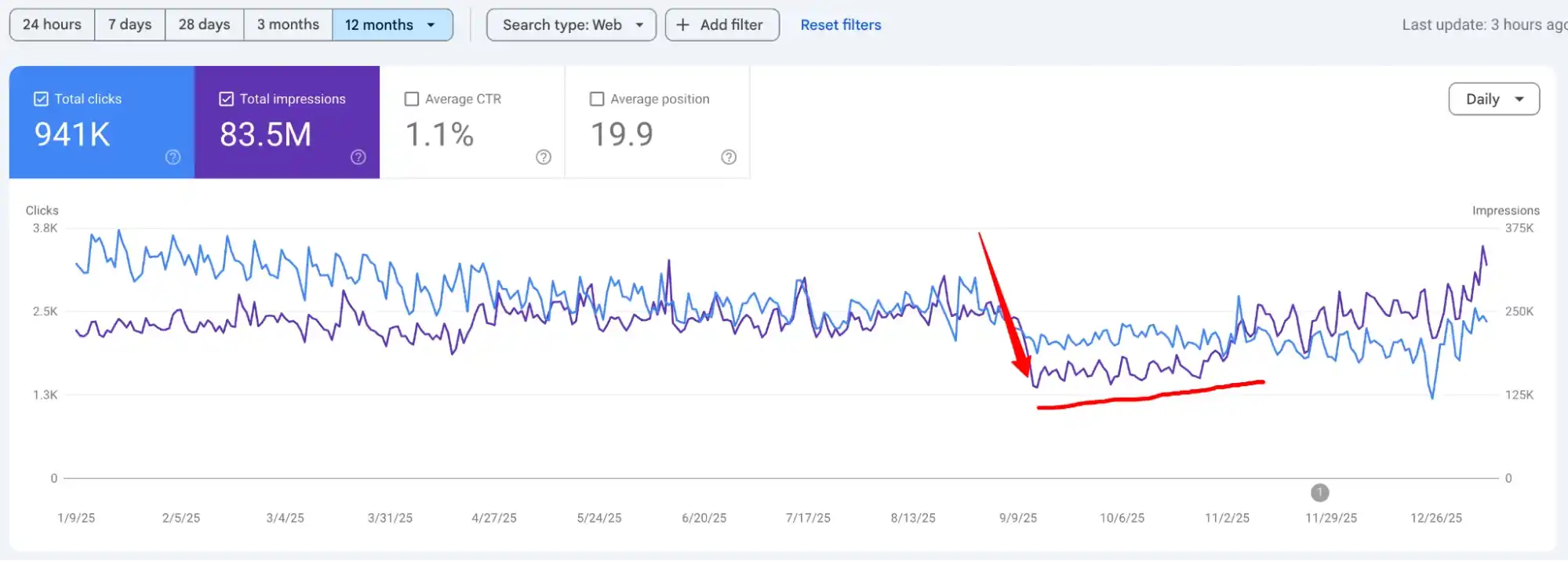
When we looked at their Search Console data, the first thing that stood out was the shape of the drop. It wasn’t a sharp cliff like a technical failure or a manual penalty.
It was a slower, algorithm-style decline that lined up with a core update date.
Digging deeper, we saw that the main damage was on their informational pages.
Lots of overlapping topics, multiple articles targeting almost the same keywords, and a big portion of thin or low-value content that didn’t deserve to rank anymore.
So in this case, the traffic drop wasn’t about crawling or indexing issues. It was Google reevaluating quality and relevance across the site, and especially across their blog.
Also read: Recover After a Google Core Update

To make this a bit easier to digest, I’ve put together a simple table with the most common reasons for sudden traffic drops, how likely each one is (based on what I see in real projects), and the typical solutions that usually move the needle.
This isn’t a perfect science or a replacement for proper investigation. Your situation will always have its own details, and in many cases you really do need someone with experience in your industry to tell you what happened and what to fix first.
Still, this overview should give you a clear starting point. Right after the table, I’ll go through each reason one by one and explain what it means in practice and how we usually approach it.
| Reason | What’s Actually Happening | How to Diagnose It | What to Do Next |
|---|---|---|---|
| Google Update Hit | Rankings drop after a core, helpful content, or spam update due to quality, intent mismatch, or trust issues | Check GSC performance dates vs update timeline, review affected pages and queries | Improve content depth, align with search intent, strengthen E.E.A.T., prune or rewrite weak pages |
| Indexing or Robots Issues | Pages are blocked, deindexed, or not crawled properly | GSC → Pages report, robots.txt, noindex tags, server logs | Fix robots rules, remove accidental noindex, resubmit pages, request reindexing |
| Redesign or Website Migration | URLs change, internal links break, redirects fail, signals reset | Compare old vs new URLs, check 301s, crawl the site, review traffic by page | Fix redirects, restore internal linking, update sitemaps, monitor recovery closely |
| Backlink Loss | Authority drops due to lost or removed high-value links | Ahrefs / GSC → Lost backlinks, anchor & referring domain changes | Reclaim lost links, build new authority links, strengthen linkable assets |
| Competitors Step on Your Throat | Competitors publish better content, acquire stronger links, or dominate SERP features | SERP comparison, content gap analysis, backlink velocity check | Upgrade content quality, refresh outdated pages, invest in stronger link acquisition |
| AI Overview & TOFU Content | Google answers queries directly, stealing clicks from informational content | GSC impressions up, CTR down; queries triggering AI Overviews | Shift focus to BOFU/MOFU content, add unique insights, target conversion-driven keywords |
I’ve said it many times: SEO is a complex industry. You can spend years building your traffic and reputation, invest most of your time and money into doing things “right,” and then wake up one morning to see that your organic traffic has been cut in half after a Google update.
When I say “Google update,” I don’t mean the tiny tweaks that happen every day.
I’m talking about the bigger waves: core updates, spam updates, helpful content: type changes, and other broad recalculations of what Google wants to show on page one.
The “solution” depends on what Google decided you’re weak at.
In many cases, it comes down to content quality and intent: too much thin content, a lot of pages saying the same thing (cannibalization), outdated guides, or articles that simply don’t deserve to rank anymore compared to what’s now on the SERP.
Sometimes it’s just volatility, and the best thing you can do is wait a bit before making big changes.
There are also cases where spammy backlinks or negative SEO attacks appear around the same time. By the way, creating a disavow file sounds nice in theory, but in reality, it rarely fixes a drop.
It’s usually much more about improving what’s on your site than trying to clean every bad link on the internet.
Also read: Our Healthcare SEO Case Studies

If you’re not new to SEO, you’ve probably already checked this, and you can almost skip this part. For most experienced SEOs, “Can Google crawl and index my pages?” is one of the first questions you rule out in a traffic emergency.
But if you’re just starting out, or your site recently went through changes (new theme, new CMS, new dev team), I really recommend double-checking this before you panic about algorithms, competitors, or anything else.
Run your key URLs through an index checker and make sure your core pages, landing pages, and blog posts are indexable and crawlable.
It takes a few minutes, but it’s the quickest way to confirm that you’re not dealing with something as simple as a noindex tag, a bad robots.txt rule, or a template change that quietly blocked half your site.
Redesigns and website migrations look simple from the outside, but they’re some of the riskiest things you can do to a site’s organic traffic. In my opinion, they should always be planned and executed with an experienced SEO team involved from day one.
Even if you think, “We’ll handle it internally, it’s just a new design / new CMS / new domain,” there are dozens of small details that can break things: URL mapping, redirects, internal linking, sitemaps, hreflang, server-side settings, canonical tags, pagination, and more.
Miss a few of these, and a stable site can suddenly look “new” and confusing to Google.
That doesn’t always mean you failed or you did not follow the current SEO trends; it can be Google recalculating signals and understanding your new structure.
Of course, there are best practices you should follow, and even Google has official guidelines for site moves and migrations.
That’s why I strongly recommend at least getting a consultation before you touch a large site. A few hours of planning can easily save you months of recovery work later.
Related article: Our Dental SEO Case Studies

You don’t need advanced SEO knowledge to guess what happens when you start losing important backlinks. If strong sites remove their links to you, maybe they updated the content, killed the page, or cleaned up old “outgoing links” lists, which can absolutely take your rankings and traffic down, especially if those were big PR-style links or key editorial mentions.
When those links disappear, the “link juice” stops flowing. Google can then re-evaluate how strong and trustworthy your site really is compared to others, and in some cases, you’ll see a gradual or even sudden drop.
Sometimes you’ll also notice your Ahrefs DR going down around the same time.
To reduce this risk, it’s smart to keep an eye on your acquired links with a backlink monitoring tool like Linkody.
Many tools can ping you every few hours or daily when a link goes missing. That way, if an important backlink disappears, you can react early; reach out to the publisher, replace it with new links, or adjust your strategy before it quietly snowballs into a bigger traffic problem.
When you see traffic dropping on specific pages, it’s always smart to zoom in and check your page-level competitors. Not just “who’s in my niche,” but: who is ranking above this exact URL for these exact keywords and why?
Ask yourself:
Remember, SEO is never guaranteed.
You can hire a great SEO agency, do a lot of things right, and still lose some positions over time.
Look at the Ahrefs charts below:
Even giants like Forbes and HubSpot have had periods where they lost a huge chunk of traffic.
This can happen to anyone. You’re not alone or “cursed” just because your graph isn’t going straight up.
The difference is in how you react. If you’ve started investing in SEO, you need to see it through.
Don’t give up at the first serious drop. Study the competitors who are now above you, understand what they’re doing better at the page level, and then come back with something that clearly deserves to rank higher.
I’m not going to reinvent the wheel here. According to LLMs’ impact on traditional search statistics, starting from the end of 2024, large language models and AI-style search features started to change how people interact with Google and other engines.
If you’ve noticed a sudden traffic drop, especially on top-of-the-funnel content, without any obvious ranking crash, there’s a good chance this is what’s happening.
You open Search Console, and your main keywords are still in similar positions.
Maybe they move a bit up or down, but nothing dramatic. Yet clicks are down. In many cases, that’s because AI overviews, answer boxes, and other “smart” features are grabbing attention and clicks before users ever reach your blue link.
One of the best ways to adapt is to rebalance your content. Instead of publishing endless TOFU articles that are easy for AI to summarize, focus more on middle- and bottom-of-the-funnel content: comparison pages, use-case content, decision-stage guides, implementation content, pricing, alternatives, and so on.
These are harder for generic AI answers to replace and are usually much closer to revenue.
It doesn’t mean you should never create top-of-the-funnel pieces again. TOFU still matters for topical depth and some AI visibility, depending on your strategy. But you need to be very intentional: the right content for the right funnel stage, not just “more blog posts.”
Keep one thing in mind: this shift is only going to continue. AI-driven search will keep stealing a part of your organic traffic.
I know how painful a sudden traffic drop is, especially if organic search is your main channel for new customers or leads. It’s very easy to panic and start “doing something” just to feel in control. But this is where a lot of people make things worse.
Here are a few things I really don’t recommend doing (all of them are based on our stories from clients who came to us after the damage was already done):
Sudden traffic drops are one of those nightmares every SEO, founder, and brand owner can face. But the worst thing you can do is panic and start changing everything without understanding what happened.
There are many possible reasons and just as many directions for a solution. In this guide, I tried to walk you through the most common scenarios I see in real life, plus a few case studies, and explain everything in simple, honest language.
Every website has its own story, and there are always exceptions. If you feel stuck or want a proper, data-backed investigation of your specific case, reach out to our SEO agency. Your “traffic drop” story can still turn into a recovery case study that
starts with us.
It depends on what you changed, but as a rule of thumb, give it at least 2–4 weeks before you judge anything. Technical fixes (indexing, redirects, internal links) can sometimes show signs faster.
Content and strategy changes usually need longer, especially in slower niches, it might take 4–8 weeks or more.
The typical pattern is: your rankings look more or less the same, but impressions and clicks are down, especially on top-of-the-funnel topics. In GSC, you’ll often see stable or slightly worse average positions, but fewer impressions for those queries compared to previous months.
Then, when you manually Google those queries, you’ll notice AI overviews, long answer boxes, or other SERP features pushing organic results further down.
If that describes your situation, and nothing else big has been changed on your site, there’s a good chance AI-style answers are eating part of your traffic.
The quickest way is inside Google Search Console. Open the Performance report, set the date range to the last 3–6 months, and switch to the daily graph for clicks.
You’ll usually see the “cliff” or the start of the slide very clearly.
You can then hover over the graph to spot the exact day things turned. If you want to be extra precise, compare that date range with the previous period and then cross-check it with your analytics and any changes you made (releases, migrations, big content pushes, etc.).
