


by: SEO Strategist
Ashot Nanayan
Updated January 16, 2026
6 min. read

WhatsApp
 (+1) 818 355 1889
WhatsApp
(+1) 818 355 1889
WhatsApp
(+1) 818 355 1889
WhatsApp
(+1) 818 355 1889
WhatsApp
(+1) 818 355 1889
I’m pretty sure I’m not the only SEO strategist who hates Google’s core updates. They’re the closest thing we have to a natural disaster in this job. You can do everything right for months, then wake up one morning and watch a chunk of your traffic disappear for no “logical” reason.
In August 2025, during one of the most aggressive spam and core updates of the year, one of our clients in the automotive industry experienced a roughly 30–40% decline in organic traffic.
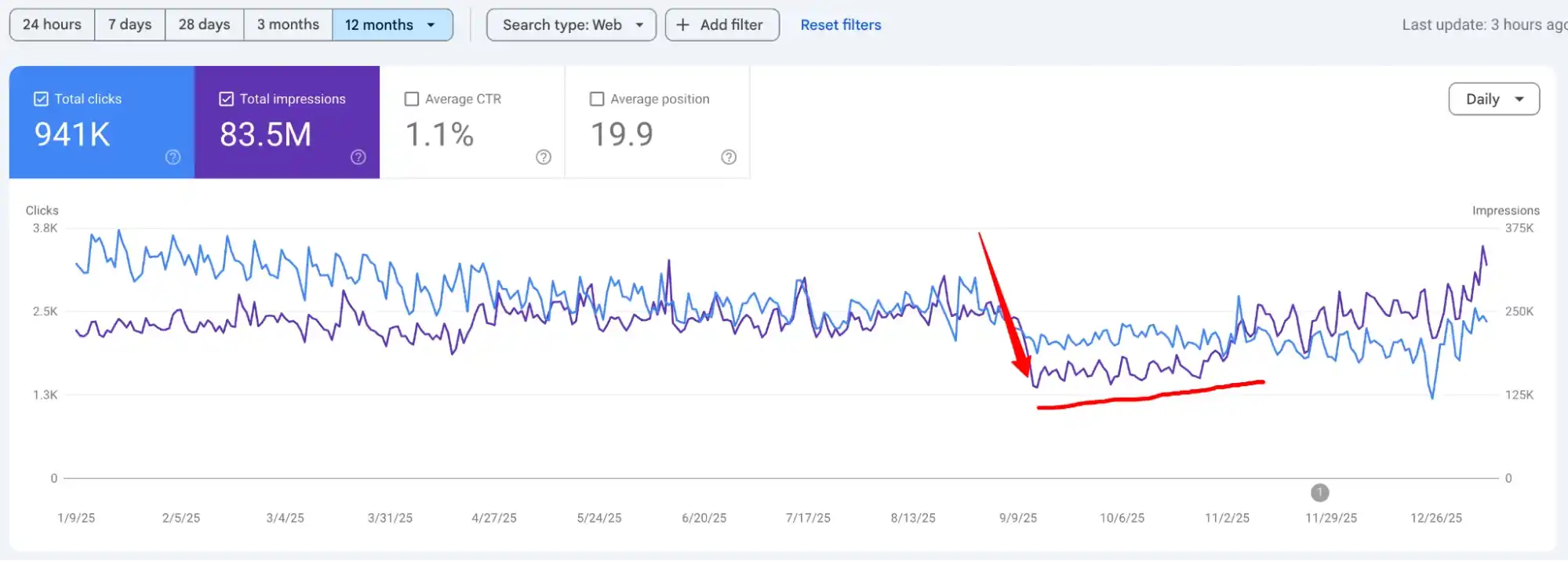
It wasn’t the first time I’d seen this kind of drop, but it still stings every single time. As usual, we rolled up our sleeves in early September, dug into the data, and started working through a recovery plan. Thankfully, we managed to turn things around.
At the start of this year, I finally had a moment to sit down and document what we did, what moved the needle (As you see in the screenshot).
If your site was also hit by a core update, I hope this breakdown becomes your next recovery playbook.
If you’d rather not fight this battle alone, you can always reach out to our SEO agency; we deal with such messes all the time, and we’re happy to jump in.
As an SEO agency, we don’t wait for traffic to crash before we start paying attention to Google. Every time a new update rolls out: small tweak or core shake-up, we stop, read, and try to understand what changed and who’s likely to be in trouble.
By the time this August 2025 spam update hit, we already knew roughly what to expect. Google made it pretty clear this one was different from the old-school spam updates that mainly hunted down spammy links, PBNs, and obvious garbage.
This time, their SpamBrain AI system was aimed at what I’d call “behavioral spam”; content that looks good at first glance, but offers almost zero real value to the person reading it.
Also read: Is AI Content Good for SEO?
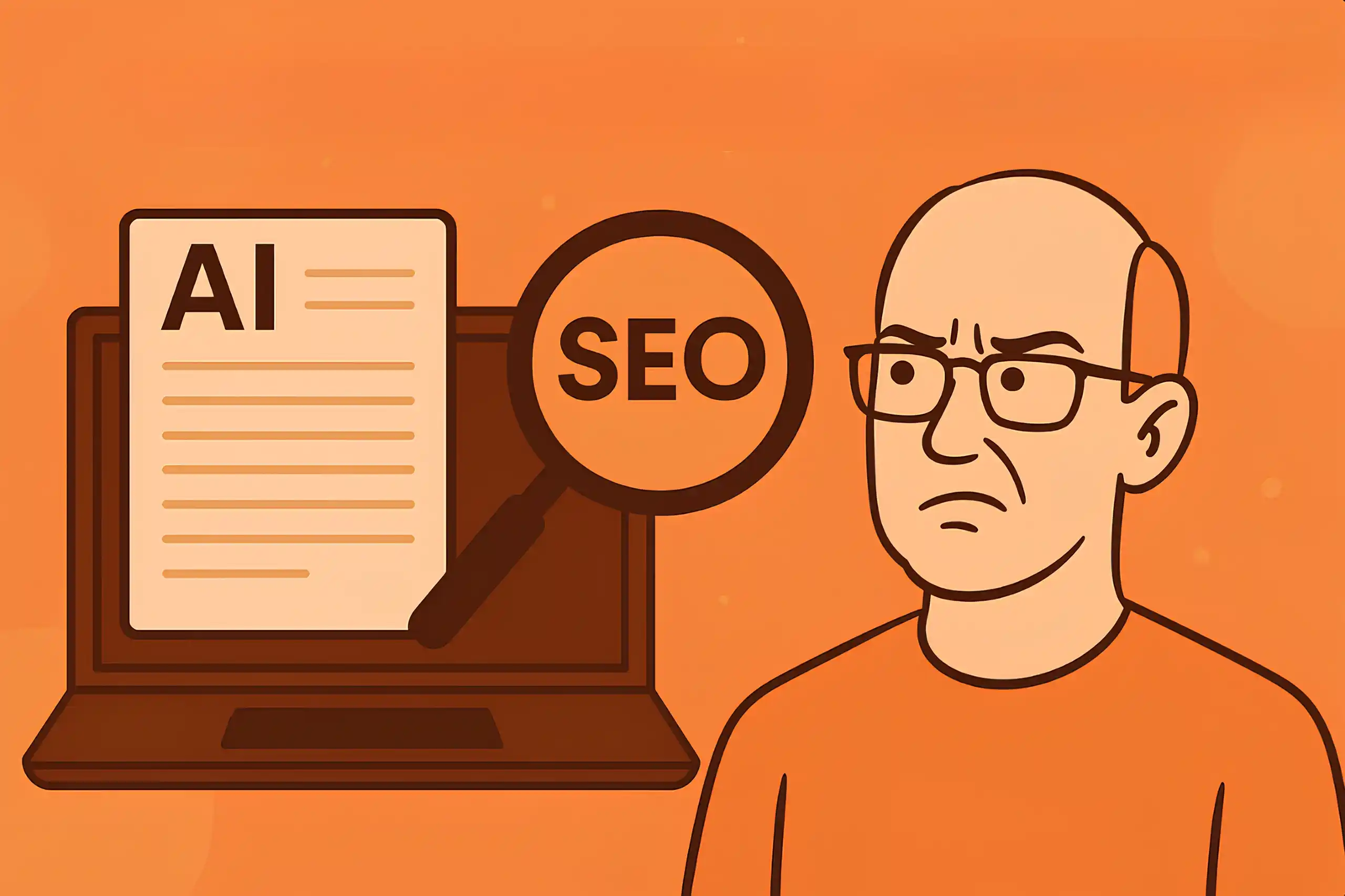
So before we even opened Search Console for this client (They approached us after the traffic drop), we already had a strong guess: the problem probably wasn’t UX or technical SEO.
The risk was in the content itself: how it was written, how often it repeated the same angles, and how much of it felt like it existed just to rank.
We jumped into Google Search Console right away, and the first good news was this: the whole site wasn’t hit. The damage was limited to a specific group of pages, and around 90% of them were informational articles.
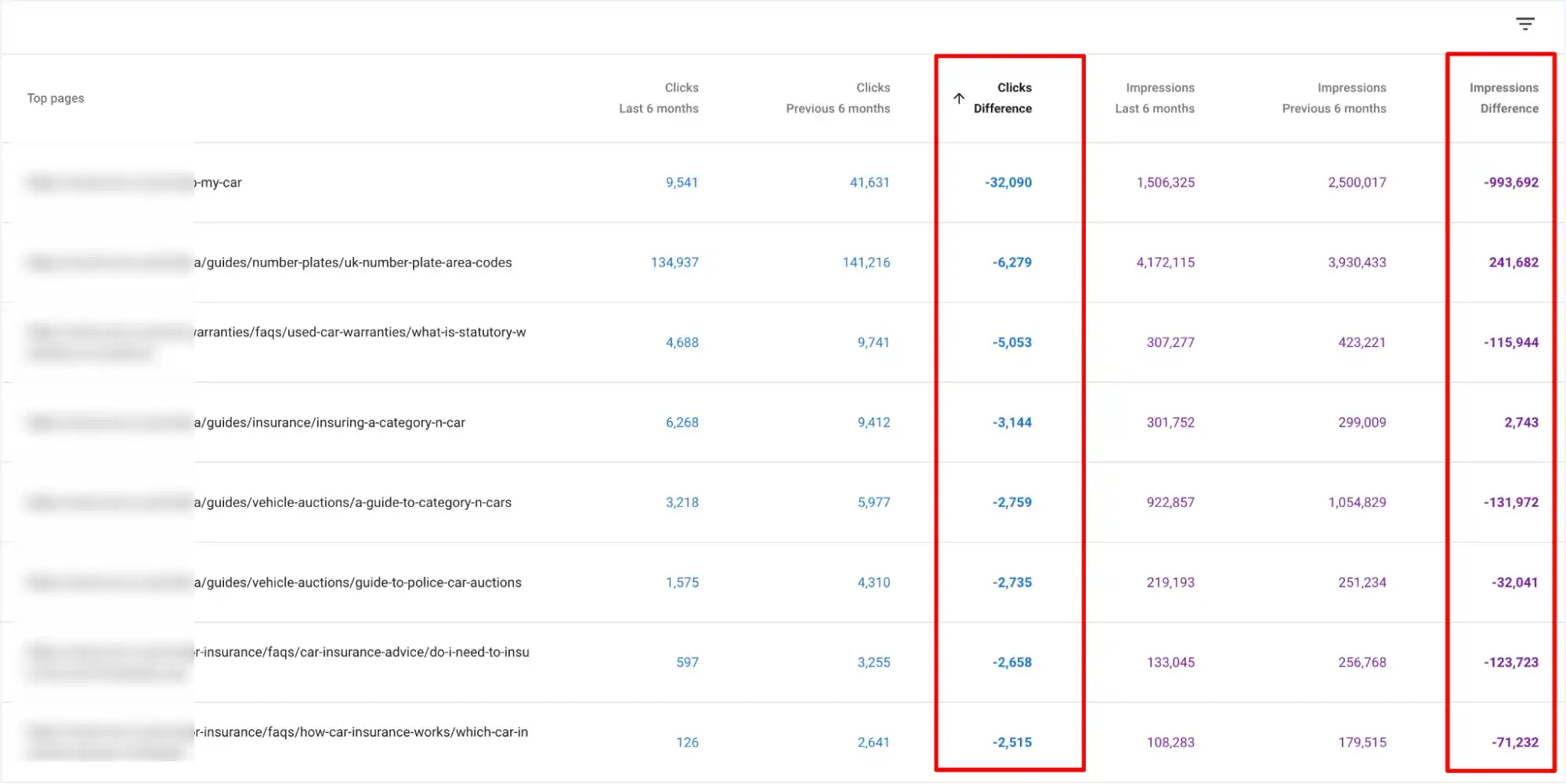
I’ll be very honest with you; this time, I kind of respected the update.
A lot of those pages were simply bad. The information about the car industry was outdated, in some cases misleading, and not something I’d feel comfortable letting users rely on.
Many of the FAQ-style pages were competing with each other, repeating the same answers with slightly different keyword angles. From Google’s point of view, it absolutely looked like spam.
So in this case, Google was right. The update didn’t “unfairly punish” a good site. It exposed a weak part of the content strategy that should have been cleaned up earlier.
One thing I always remind clients: not every core update hit means your site is broken. Sometimes the impact is temporary. If you honestly know your content is strong, helpful, and up to date, and your site is in good technical shape, don’t rush to tear everything apart in the first 3–7 days.
Google itself has said there can be turbulence during and shortly after an update rolls out.
In some cases, things stabilize and partially recover on their own. So before you start deleting content or changing your whole strategy, give it a bit of time, analyze the data, and make sure you’re reacting to a real pattern, not just a few bad days.
First of all, we exported all the blog URLs from their sitemap and added them to a Google sheet, and went through their target keywords to spot cannibalization issues.
In many cases, three or four articles were basically fighting for the same queries with the same angles. We also checked how relevant each piece was, how well it answered the search intent, and when it was originally published or last updated.
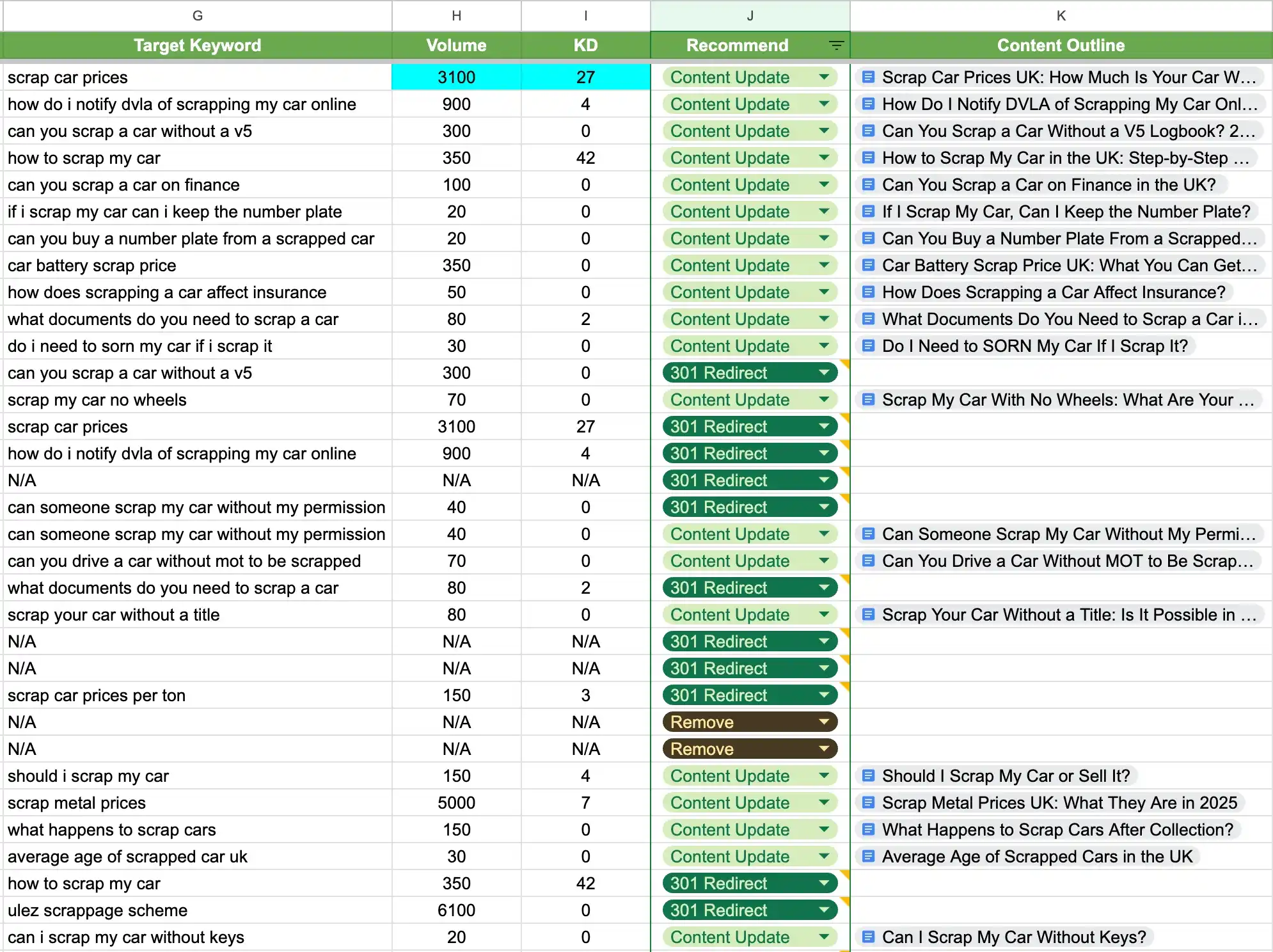
Once we had the full picture, we started cleaning house. Low-quality and overlapping content didn’t deserve to be there and confuse users and Google, so we:
Next
Because we were already touching a lot of these pages, we also used this as a chance to improve how the pages looked and felt.
For some of the key URLs, we redesigned the layouts and added useful elements that actually matched the intent of the page; things like location maps where it made sense, extra information sections, and proper on-page FAQs.
UX probably wasn’t the main reason they were hit, but if we’re updating a page anyway, we prefer to improve everything in one go.
Then we went deeper on the content side. For each important page, we did page-level research, built proper content outlines, and only after that handed things over to our in-house writers.
They wrote human content based on those outlines, instead of just “filling space” around keywords.
We tightened internal linking around these pages as well, making sure the site clearly showed which pages were the main authority on each topic.
But that wasn’t all. We also decided to push harder on internal linking.
From the stronger, higher-ranking pages, we added clean, relevant internal links pointing to the pages that were hit. We used natural anchor texts that matched what those pages were about.
This helped “circle” the link equity inside the site instead of letting it sit on a few top pages. In my opinion, this was one of the key factors that helped those affected URLs recover traffic much faster.
Also read: 10 Link-Building Case Studies
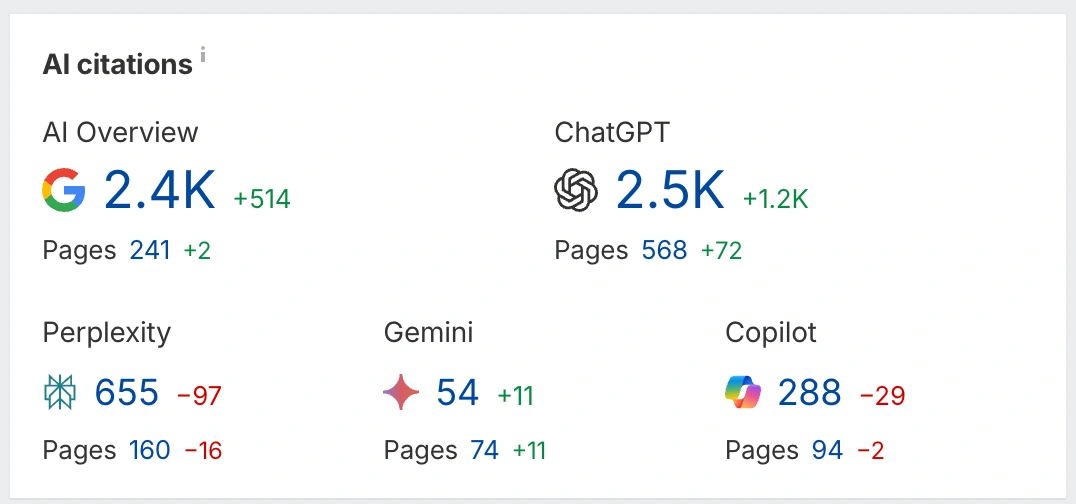
Within about a month of making all these changes, we started to see the outcome. The pages that were hit began to recover, and interestingly, some other pages on the site also picked up more traffic and visibility.
Not just in classic blue-link results, but in newer, answer-style search experiences as well.
Look at this. Beautiful, right?
But I want to be honest with you: We were good, but we were also a bit lucky.
It’s not the first time we’ve gone through a recovery like this, and it doesn’t always play out this fast. There are situations where you fix everything that makes sense, clean up the content, improve the structure, tighten internal links… and the graph still refuses to move for weeks.
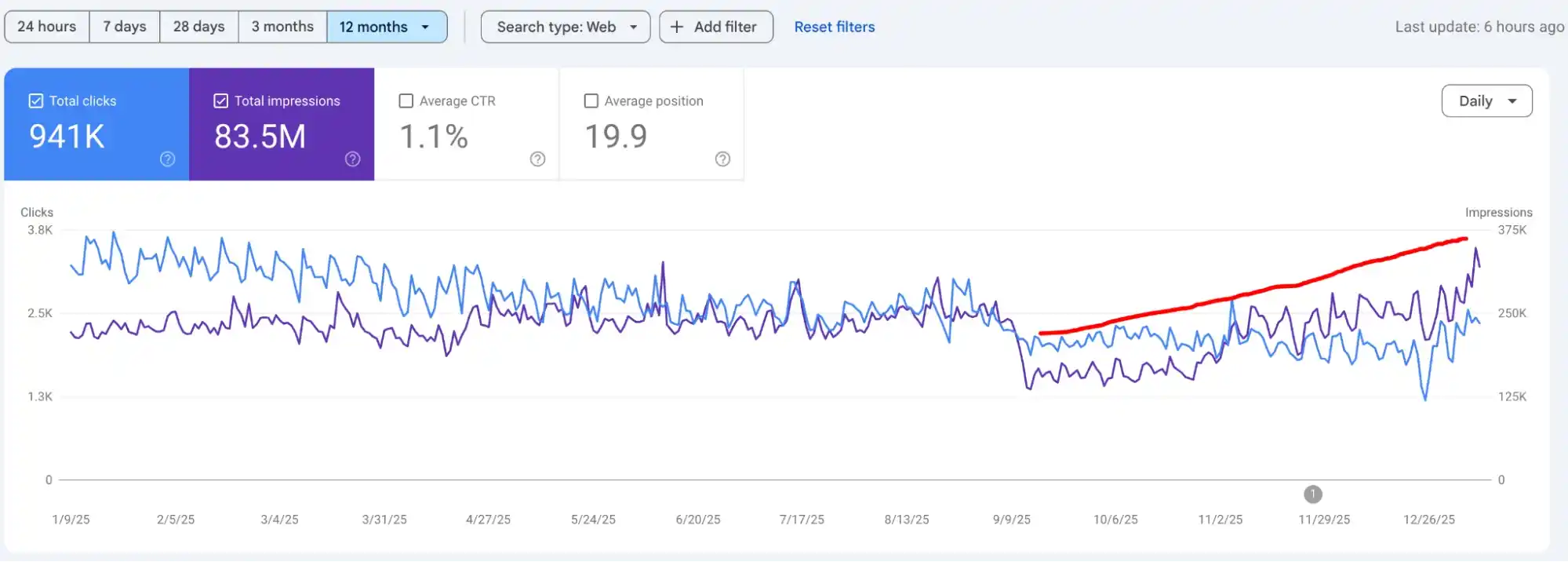
You stare at Search Console and think, “Great. Now what?”
That’s the reality with core updates.
They don’t always give you a clear reason, and sometimes the recovery takes longer than it “should,” even when you’re doing things right.
In this case, we had one big advantage: a lot of the content that got hit was really low quality and outdated. Once we removed, merged, and rebuilt those sections properly, it aligned perfectly with what this specific update was targeting.
That’s why the recovery looked “clean.”
In other cases, we see sites get hit even though the pages look pretty good. Those are harder. They need more patience, more testing, and a longer window before you can judge whether your changes worked.
Related article: 10 eCommerce SEO Case Studies

If this case study helps even one business owner feel less lost after a core update, I’ll be happy. I tried to keep everything here as real as possible.
If you’re dealing with a similar drop right now, there’s obviously no guarantee that the same steps will fix your site. Every project is different. But if you want an agency that rolls up its sleeves, looks at the data, and tells you the truth instead of selling a dream, Digital World Institute might be a good place to start.
I look at timing first. If the drop starts exactly when a known update is rolling out, and there’s no technical issue, tracking change, or manual action, that’s a strong signal. In Search Console, I usually see many queries shifting at once rather than one or two keywords disappearing.
I also cross-check with Google’s announcements and industry chatter to make sure the dates line up.
Core updates don’t judge your site as one block. They hit patterns. If one content cluster is weaker, outdated, over-optimized, or looks mass-produced, it will get hit first while other sections stay stable or even grow.
You usually see the pain start with specific topics, templates, or content types, not the entire domain at once.
Also read: 5 SaaS SEO Case Studies

Always start with the “loser set” and the pages around them. Fixing everything at once usually turns into chaos and makes it hard to see what worked.
Focus on the most affected pages, their internal links, and any similar content that could be dragged down next.
Once that cluster is cleaned up and stable, then you can expand to the rest.
Open Search Console, check which queries dropped, then compare the current top results for those queries. Look at what the winners do differently: depth, structure, freshness, angle, intent match, and type of page.
Then check your own page for thin sections, outdated info, weak headings, poor internal links, or over-optimized patterns.
The gap between your page and the current winners is usually your answer.
If the topic is not important for your business, has no traffic potential, overlaps with a stronger page, or is so outdated that rewriting it would be a complete waste of time, it’s usually better to remove or merge it.
In many cases, I’ll redirect it into a stronger, broader page instead of trying to “save” a dead URL.
Related article: How We Made Google’s AI Overview Work for Us
Same boring intro on every article, no original examples, no data, no stories, and no opinion. Paragraphs that just rephrase the search query, repeat headings from competitors, and never say anything specific.
Overused templates, identical subheadings across dozens of posts, and content that could fit on any site in any niche are all clear generic signals.
They help support trust, but they don’t fix weak content. A clear author, real expertise, company details, contact options, and some proof you exist are all good signals.
But if the article itself is low-quality, you won’t “out-bio” that. The page has to be useful first; the E-E-A-T elements simply back it up.
In many cases, you start seeing early signs within a few weeks, but the full recovery often takes a couple of months or more. Sometimes you only see the full impact after the next core update.
So, do the work, monitor, adjust, and avoid judging the results too early.
They panic and change everything at once. Deleting tons of pages, rewriting the whole site blindly, switching themes, changing URLs, and buying random links all at the same time is a recipe for confusion.
You lose the ability to see what helped and what hurt. The smarter move is to slow down, diagnose properly, and apply focused changes step by step.
